skip to main |
skip to sidebar
Still life photography is a genre by itself. Derived from the old masters and their paintings, photographers collect stuff to photograph it. The still life has no fixed rules of right and wrong and gives an incredible freedom in lighting and composition. Some things should however be kept in mind when trying to make a still life that stands out.A themeA still life should be more than just a collection of thingies. The vast majority of great still lifes has a theme. It could be anything: a profession, a season, any activity. a song title, a color, the list is endless. The main point is, that the items in the still life should be presented in a theme, and be consistent within the theme. Cornucopia still lifes for instance implement abundance, so they require a lot of items. ICT still lifes would become inconsistent if done against a very natural or classical background. Table shotsMost good still lifes are table shots. That is, the camera is at the same height as the scene is, or just a little higher. This camera standpoint provides a natural looking perspective, altough in real life, we would not look at most of these things horizontally. I do know of a couple of successful exceptions to this rule, so it's no fixed rule. Like always, deviating from the rules provides an extra handycap, but it can work out great.Composition, background and lightingThe freedom in composing a still life is endless. One can use any composition rule, combine a couple of them or ignore them all together. Combinations of the rule of thirds with other rules are often used, but again, feel free to break the rules as you go.Background and lighting are free too, but they should not attract too much attention and be consistent with the theme. Neutral backgrounds are okay, but if the still life has a nautical theme, why not use a nautical map as a background? If it is too distracting, use a shallow depth of field to tune down it's presence. White backgrounds are fine too.Still lifes often use light tents are a single light source that suggests natural light through a window (often using fill lights or reflectors as well). But if you feel backlight works better, why not give it a try? As long as all the relevant details are revealed properly and the lighting does not distract from the the, it's fine.
Everyone who has ever tried shooting macro shots knows that close-focussing distance comes with a huge loss of depth of field. Even at fairly small apertures like f/8 or f/11 it is hard to get an entire bug in focus. Yet if we look at 'professional' macro-shots, we see crisp and clear images. How on earth do they do that? The answer is simple: use a flash and narrow your aperture even further. Macro lenses often go up to f/32, so that's not the problem. The problem is the direction of light. On-board flashes come from the wrong direction. Your lens gets in the way and casts a shadow over your subject. So, don't use an onboard flash, use a separate one.Ring flashesFlash manufacters make so-called ring flashes. They are to be mounted on your lens, and provide light from the exact same angle as your lens. This implies a total lack of shadow. It also implies that light is pretty flat, which may be desirable for some types of portraits, but not for macro photography. The very expensive types have the option of balancing (even aiming) left and right lights to solve this problem, but they come at a price. Apart from that, a ringflash might simply get in the way while trying to shoot bugs.Off-camera flashesThe other option is to use an off-camera flash. You can either hand-hold it (very flexible), hand-hold it on a monopod (for more reach and stability), put it on an extension arm mounted to the camera (follows the camera wherever you point it) or put it on a tripod (stable, and you have both hands available for the camera). I use either of these options, depending on the situation. The main disadvantage of using an off-camera flash is the shadows it casts. This is not always a problem, but if it is, it may be softened by using a fill flash or a reflector. I have a nice small ring reflector that fits on my lense. It fills just like a ringflash would, and since it is not my main light source, I do not have the problem of flat lighting.
Reflections are a great way to give some depth to your pictures. This is obviously true for a reflection of a boat on a lake, but it also holds for studio shots. I will focus on the latter, as these are the type of pics where you actually make the reflection. On the lake, it’s already there, you just need to capture it. Obviously, reflections can be created in post processing if you like, but it’s much more fun doing it yourself.
What surface to use?
Obviously, we need a reflecting surface. Mirrors are reflective, and they can be used, but the result is often disappointing. Reflections become too clear, giving your picture an awkward look. But hey, you can try it and might like the result. Plain glass is a good alternative, and some types of transparent plastic may work well too. A high finish wooden board with shiny black paint is okay, but sensitive to scratches.
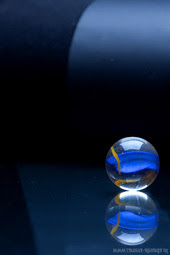
If you use glass, use a dark surface below it for perfect reflections. If it has a pattern, it might shine through. On the other hand, this might be want you want. In the second pic in this article, I used a striped surface to have it conflict with the round shapes of the subject and background. Whatever surface you use, make sure it is clean from dust, scratches and fingerprints. It is a big pain to remove those in post processing.
 The back-light method
The back-light method uses light from the back to create the reflection. The light does not really have to come from behind, it can be a well-lit background as well. In fact, this option is used more often. The light from the back bounces on the glass towards your lens. Note that the reflecting surface will take on the color and pattern of the background. This provides unlimited creative possibilities.
Back-lighting the scene would of course imply that the front remains underexposed, so you will probably want to use a fill flash as well. Just play around a little to find the right position and lighting ratio to light the front without disturbing the reflection. You will see it’s not that hard.
 The top light method
You might not be surprised: the top light method uses light from the top to bring out the reflection. It is very suitable for abstract shapes. The reflecting surface will be black unless you put your background so close that it catches some light. By moving your background further and closer, you may vary the amount of reflection it generates. Likewise, aiming an extra light source at your background will increase its presence in the reflection. You may want to use a fill flash, but you don’t need to. The pic to the left was made with a single light source. The light coming from the top accentuates the shape of the subject. You can click on the pic to see a set up of the picture.
More resources:
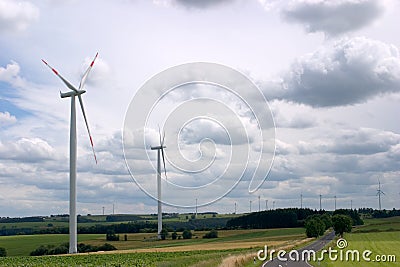 Don’t you hate it when that happens? You made a great pic and the subject of your pic is well exposed, but the sky is blown out white. It gives your picture a cheap and snapshottish feel. Why do the pros always have these great cloudy skies in their picture? More important, how do I get those as well?
Let’s first take a look at the cause of these blown out skies. They occur on overcast days, especially when a thin and even layer of clouds lays over the entire sky. The clouds work as a giant diffusion screen and you are shooting against the light whenever you have some sky in your composition. The sky will be too light compared to the rest of your image.
Composition
If you can, exclude skies from your composition or find that piece of sky where clouds are either thicker or absent. True, it’s the easiest tip to give and the hardest to execute. But try it anyway and be creative. Get closer to your subject, change your angle to have a tree or building behind it, or photograph from a high viewpoint to lower your angle.
Filters
Using filters on your camera might help, but don’t count on miracles to happen. If there is any blue in the clouds, orange or red filters may bring out the shape of the clouds. Obviously, this is useful only if you are shooting black and white. Neutral Density gradual (Nd grad) filters and polarizers may help a little. Filters –of any kind- will work bust when clouds are thin, i.e. when you can feel the sun through the clouds.
Use deep DOF and underexpose
A fairly simple thing to do is underexposure your picture. If you underexpose by about 1 stop (i.e. divide your exposure time by two), details in the clouds are more likely to become visible. Some blown out parts may remain, but at least it’s not all white. Combine the underexposure with a deep depth of field, so that the regained details are not lost in out-of-focus softness.
Better still: Bracket!
Obviously, with exposure correction, you will get the skies right, but have your subject underexposed. The best thing to do is take a couple of shots at different exposures and combine those in post processing. This does require some post processing skills though. HDR-software might come in handy too.
Fill flash
If your subject is close enough, use a flash to light your subject, allowing you to expose both the sky and your subject correctly. Depending on the type of flash and camera you’re using, you can either try to find the right amount of flash power or find the right combination of exposure time and aperture to get correct exposure of both the sky and the subject. I will devote an article to fill flash soon. ETA: done, you can find it here.
Post process
You might also want to adjust your picture after shooting it. Many people have suggested the ‘replace color’ option in Photoshop, or replacing the white with a picture of a sky. I am not too pleased with the results of these techniques. The results are okayish for small prints in the family or holiday album, but a photo enthusiast will probably want a better result. Below, you’ll find a link to a promising tutorial with a more natural looking result.
More resources
A nice PS tutorial
Wikipedia on bracketing
How to use fill flash
You have probably heard terms like soft box, beauty dish, and standard head before. You may even own a couple of these and have some knowledge of how and when to use them. This article shows and discusses the main differences between studio lighting reflectors, thus helping you to understand even better when, how and why to use which reflector. I have used a single flash head aimed at an apple, using 6 different types of reflectors. The set-up was fixed, although the light intensity of the flash was varied to prevent over- or underexposure.
 Standard reflector: All the light is reflected and sent towards the apple in a fairly direct manner. We see a pronounced shadow, as well as a clear highlight. The light falls off slightly towards the edges of the corner and the picture has a slightly blueish cast, suggesting that this particular standard reflector is not exactly neutral.
 Snoot: The light is bundled towards the apple and leaves a very sharp shadow, strong contrast and a hard highlight. Light falls off at a short distance from the apple, causing natural vignetting. Snoots do loose a lot of light, this picture required an exposure of three stops more than that taken with the standard reflector.
 Soft box: basically a ‘box’ with internal reflection and diffusion, thus creating a larger surface of light. As you can see in the picture, both the shadow and the highlight are very soft and fall of is minimal. Because of the larger surface, the light more or less surrounds the apple, thus causing a double shadow: a small and (relatively) sharp one, and a larger, softer one.
 Beauty dish: Mainly used for lighting faces, allowing for soft light without loss of detail. The light is reflected against a small disc, onto a larger one, which in turn reflects the light towards your subject. This reflection causes some diffusion, while keeping the direction of the light. As you can see, both shadows and highlights are more pronounced than in the case of the soft box, but considerably softer than the light produced by the standard head. Like the soft box, the beauty dish has a larger surface, providing the double shadow.
 Reflecting umbrella: The flash head is turned away from the subject and flashes into an umbrella (white or silver, or gold). The umbrella bounces the light back on the subject. It gives a very even light, making it great for use as a fill flash. Compared to the though umbrella (next pic) it has a little more light fall off. Some types of umbrellas also permit light to pass, allowing it to reflect from the wall or ceiling as well. That’s what causes the warm effect in this pic.
 Through umbrella: Similar to the previous one (in fact I used the exact same umbrella). Now the head is turned towards the subject and flashes through the umbrella, making it act like a diffuser rather than a reflector. The effect is similar to a reflecting umbrella, but looses less light and light falls off slower.
More resources:
Some theory on soft and hard light in wikipedia
A related strobist-article
Easy to make DIY snoot
Forum discussion on BD vs SB
Texture, unwanted as it may be by the ageing model, can bring pictures to life. Whether you are photographing food, objects, landscapes or character portraits, bringing out the texture in your pics adds to their realism. Bringing out texture by (over)sharpening in post procesing is bound to lead to disappointing results. Good lighting is much more effective and will make your viewers want to reach out and touch your pictures.
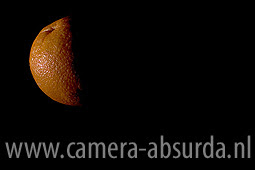 To understand how light affects texture in your pictures, you must first realize that texture basically consists of differences in hights. Take an orange for example. The skin of an orange is smooth, but is has tiny little holes all over. Now let’s light the orange from the front. The light will fill all the little holes and we will not (well, hardly) be able to see them. If we light the orange from the side however, all the little holes will be filled with shadow, and therefore show up as dark spots.
It is as simple as that: light straight from the front: almost no texture. Light from the side: vissible texture. That’s why ring flashes are so usefull in model photography. They give light straight from the front of the lens and hide most of the texture in the model’s skin better than any post processing can. But in most other type of photographs, we do want texture. So if you want some detail in your landscape shots, keep the sun to the side (which emphasizes the effect of polarizers as well, see last week's article). When you are shooting a character portrait of your grandpa, place him with one side to the window. For food photography, use at least one light source from the side to bring out the texture of the food. And for pictures of your furry pet, well, I think you know by now.
You can vary the amount of texture in two ways. With a single light source, turn your light source around the subject from front (little texture) to side (a lot of texture). If you can not move the lightsource, turn your subject. If you have more light sources available, use one from the front and one from the side and vary their relative strength (we will have an article on lighting ratio shortly) and see what happens. Experiment untill you are pleased with the result.
More resources
Using light to create texture in your photography
The importance of texture5 ways to make your texture photos pop


